

HTS400, Haas Tool Presetter Kit, 40-Taper Toolholder Sleeve


Download documents
Technical specifications
Type | Tool Presetter |
Taper | CT40, BT40, SK40 \ DIN 69871 |
Country of Origin | Italy |
This kit includes the following items:
Part #: 09-0011
$1,399.95
Quantity:
1
Part #: 09-0012
$100.95
Quantity:
1
Part #: 09-0013
$495.95
Quantity:
1
Part #: 09-0014
$39.95
Quantity:
1
Part #: 09-0021
$167.95
Quantity:
1
Haas Product Warranty - 1 Year
Technical Specs | |
| Maximum Diameter (X axis) | 12.598 in / 320.0 mm |
| Maximum Height | 15.748 in / 400.0 mm |
| Glass Scale Resolution | 0.00004 in / 0.001 mm |
| Magnification | 40X |
| Storage (Number of Tools) | 5000 |
| Storage (Number of Machines origins) | 50 |
| HTS400 Height (A) | 35.0 in \ 889.0 mm |
| HTS400 Length (B) | 35.0 in \ 889.0 mm |
| HTS 400 Width (C) | 21.0 in \ 534.0 mm |
| Table Height (D) | 36.0 in \ 915.0 mm |
| Table Overall Length (E) | 49.5 in \ 1257.0 mm |
| Table Top Length (F) | 36.0 in \ 915.0 mm |
| Table Top Width (G) | 24.0 in \ 610.0 mm |
| Connectivity | USB, LAN, Wireless Scanner |
| Power supply | 110V (1.8A) \ 230V (1.6A) |
| Country Of Origin | Italy |

STANDARD FEATURES
The HTS400 Tool Presetter comes standard with the following items:
- 1x 09-0010: TOOL SETTER WITH ISO 40 TOOL SLEEVE
- 1x 09-0011: TOOL SETTER TABLE TOP / CABINET
- 1x 09-0012: INDUSTRIAL WIRELESS DATA MATRIX SCANNER
- 1x 09-0013: THERMAL PRINTER
- 1x 09-0014: LABELS
- 1x 09-0021: ISO 40 TOOL TRAY
TECHNICAL DOCUMENTS
Haas HTS400 Step-by-Step
This in-depth video dives deep into the inner workings of the HTS400 Tool Presetter. If you’re about to put one of these in your shop or you’re really interested in the exact details of this machine’s many capabilities, then you should definitely pull up a chair and give this exhaustive video a watch.
Mitchell O’Meara is one of our resident Tool Presetter experts and he goes into exacting detail about the variety of tool features you can measure and the many ways you can use the HTS400 to improve your process.
The Haas HTS400 Presetter
Never make a mistake when manually typing in an offset value again . . . and don’t pay extra for the convenience.
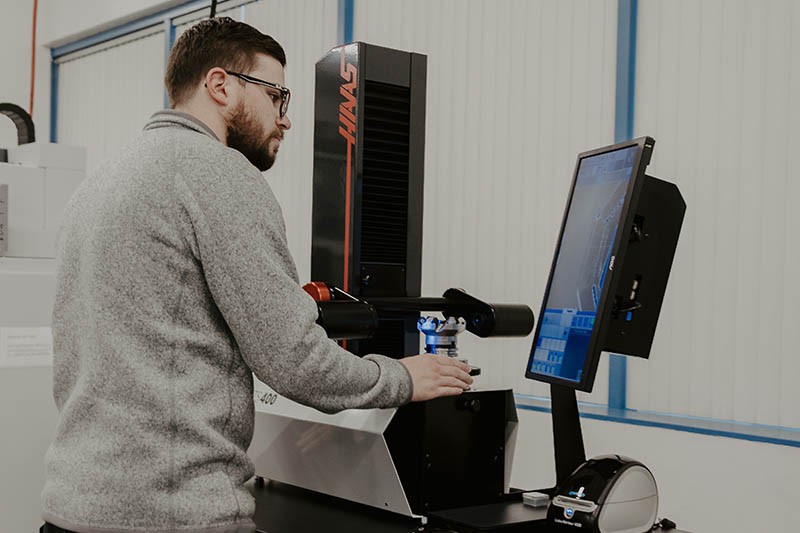
The Haas HTS400 Tool Presetter comes complete with a high-precision ISO 40 tool sleeve capable of holding any 40-taper toolholder, including CAT40, BT40, SK40, DIN40, etc. Optional interchangeable tool sleeves include ISO 30, ISO 50, and HSK 63A. Each tool sleeve has a reference notch to ease calibration.
The package also includes a heavy-duty table with storage shelf, and a tool tray capable of holding eighteen 40-taper toolholders.
The HTS400 connects to your local area network (LAN), and the built-in software includes post-processors for Classic and Next Generation Haas controls, as well as dozens of other control types. The Haas post-processors format the tool measurement data into files that can be transferred to the Haas machine over the network, or written to a USB memory device to load directly into a machine control.
However, the preferred method is to use the provided thermal printer and the Haas industrial data matrix scanner. The HTS400 package includes everything you need to print a label for each tool, with offset data imbedded in a data matrix code, similar to a QR code.
The HTS400 software formats the measured tool data and other tool information into a data matrix code. The connected thermal printer then prints a label for each tool. Use the Tool File Wizard or the Tool Scan Wizard feature on Haas NGC controls (software version 100.20.000.1200 or later) and the included wireless industrial data matrix scanner to scan the tool data from each label, and update the tool offsets in the control as each tool is being loaded into the Haas machine.
The Haas Wireless Industrial Data Matrix Scanner uses 2.4GHz wireless operation utilizing a USB receiver. It also comes with a USB cable for wired connection to the Haas control, and for recharging the built-in 2000mAh battery.
The included thermal printer prints the tool data to the provided labels as a data matrix code, with the information embedded. Direct thermal printing eliminates the need for costly ink or toner, and provides professional quality prints at 300 x 600 dpi. Printing is fast and efficient, and utilizes standard DYMO brand labels.
The Haas HTS400 is a fully equipped, sturdy, and easy-to-use tool presetter at an amazing price. With its user-friendly Windows-based operating system, measuring tool geometry and getting the values into your Haas CNC are easy and intuitive.
This Kit Contains:
- 1x 09-0010: TOOL SETTER WITH ISO 40 TOOL SLEEVE
- 1x 09-0011: TOOL SETTER TABLE TOP / CABINET
- 1x 09-0012: INDUSTRIAL WIRELESS DATA MATRIX SCANNER
- 1x 09-0013: THERMAL PRINTER
- 1x 09-0014: LABELS
- 1x 09-0021: ISO 40 TOOL TRAY
Technical Details
The HTS400 is a complete tool presetting solution that includes everything you need to start dramatically reducing your setup times – right out of the box. The Haas Tool Presetter moves the tool measurement function out of your machine – so it can continue making chips (and money) – and into the shop, where the hourly rate is lower.
The Haas HTS400 Presetter Includes:
- ISO40 Tool Sleeve
- Sturdy Universal Table Top / Cabinet with ISO40 Tool Tray
- Industrial Wireless Data Matrix Scanner
- Thermal Printer
- Labels
Optional Tool Sleeves Available:
- ISO30 Taper
- ISO50 Taper
- HSK63A
Reduce Setup Errors
Does your shop have a tool presetter? One that prints labels with tool offset data for each tool?
That’s great! Now go watch your operators. Are they literally typing the offsets into the machine from the labels?
Stop relying on fat-finger data entry! There is a MUCH better way.
With the HTS400, you have three options to get the tool offset data into your Haas control quickly and easily.
Tool Data Transfer Methods:
- Over wired LAN connection – Good
- Via portable USB memory device – Better
- Via wireless data matrix scanner – Best
*Please Note the DYMO label maker must only use the specified DYMO labels for the life of the printer.
Seamlessly Transfer Offset Data
Once a tool or group of tools is measured, you have several options to get the data into the Haas control.
Haas Next Generation Controls (NGC) with the latest software include support for the HTS400 with a Tool Scan Wizard and Tool File Wizard. At the HTS400, use the supplied Thermal Printer to print offset data labels for each measured tool. At the Haas machine, use the supplied Industrial Wireless Data Matrix Scanner to read the offset data from the printed labels into the control. The Tool Scan Wizard guides you through scanning the label, loading the tool into the spindle, and then executing a tool change to the next tool to load the data.
The HTS400 has post-processors for Classic and Next Generation (NGC) Haas Controls. These post processors format the tool offset data and save it to files that can be copied to a USB memory device at the HTS400, and that USB device can be delivered to the machine with the measured tools. For the Classic controls, this is the best option for loading the offset data. The same method also works for NGC controls.
Another option is to connect the HTS400 to your local network and transfer the offset data files directly to the machine control and then load the offsets. Loading these offset data files only appends the offset data of the offset numbers measured on the HTS400. Tool offset data for tools not measured remains unchanged.
Tool Presetter Support in NGC Controls
Haas Next Generation Controls (NGC) with the latest software include support for the HTS400 with a Tool Scan Wizard and Tool File Wizard.
Press [ALTER] from the Tool Offsets page to launch the wizards.
Tool Scan Wizard and Tool File Wizard
The Tool Scan Wizard allows you to scan tool measurement data for individual tools from printed labels, and either merge the data on the label with data already in that particular offset, or reset all data for that offset and then load the scanned data.
The Tool File Wizard also gives you the choice to merge data, or reset the data and then load all the offset data. The wizard then cycles through and gives the option to perform a tool change to each tool with imported data.
Be sure to check out the Haas Tool Presetter How-To Videos for much more information on using the unit and these features.
CUSTOMER TESTIMONIALS
Primary Machine and Repair
"The HTS400 has really helped us for our overnight jobs. Originally, we were really worried about the reliability and accuracy considering no one would be standing at the machine the whole time. However, with the tool management feature, we know that it’ll keep track of the runtime and when we need to change it out. This really helps with reliability as well as cost management because we know when to change the tools and it keeps the scrap rate really low."
– Cherish Vining, Owner
How-To videos pre-loaded with every Tool Presetter
ADDING A TOOL PRESETTER TO YOUR CNC
THE OLD WAY
- Find a tool pre-setter that you think can work for your needs.
- Hope that training and service are available in your area.
- Struggle through set up and integration into your shop’s processes.
- Never quite get the “ease of use” promised for getting the tool setting information into the machine.
THE HAAS WAY
- Go to HaasTooling.com
- Select the Haas HTS400 (online financing available!), and use a single bar code scan to input all tooling data into the Haas control.
- Delivery right to your door, with an extensive library of videos and documentation built-in, and all the necessary information and support available at HaasTooling.com.